
Year 7 Library and Research Skills
Locating & Selecting Sources of Information


By the end of this lesson you should be able to:
- Explain the difference between a library search and a web (or Google) search for locating and selecting information
- Effectively locate and retrieve quality sources of information when researching
- Select suitable sources of information when researching by critically evaluating information using the CRAAP test method
Library Search vs Google Search

Imagine you have a research assignment due in a couple of weeks.
Think to yourself:
Where should I locate the information I need?
Should I start with a Google search and hope the search results are good enough and suitable for what I need?
Or should I try using the MLC Library and all the search tools the library provides?
Or should I use both?
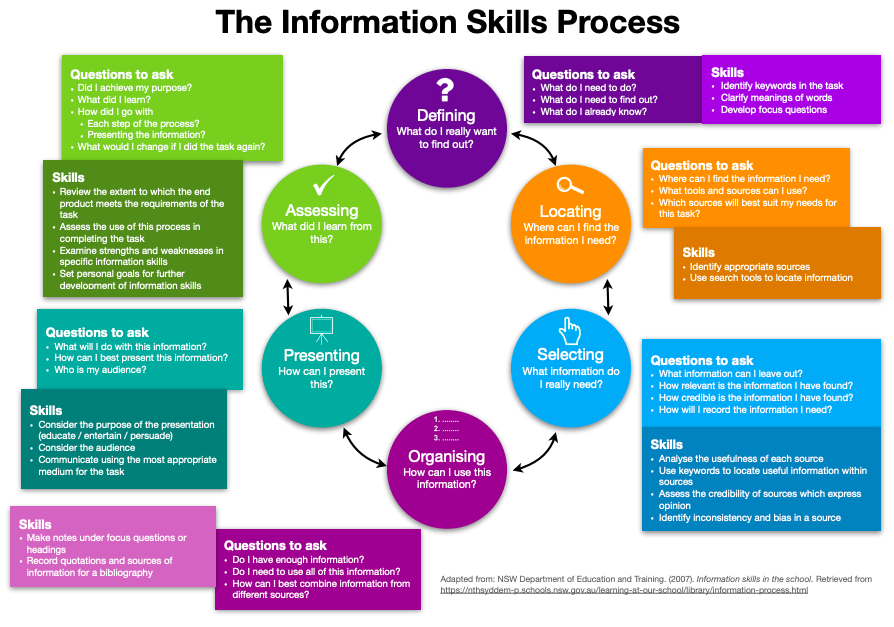
Being able to LOCATE and SELECT reliable and credible sources of information is an important part of your research process.
Watch the following video:
Consider: What are the advantages of using the Library to locate information?
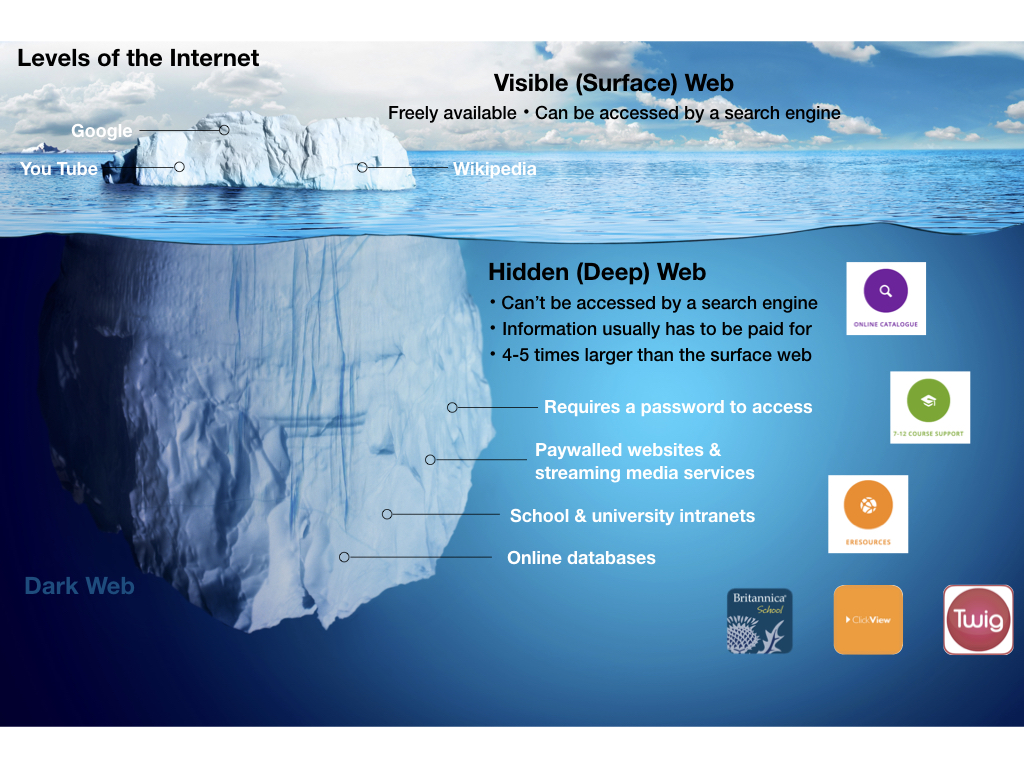
The Iceberg analogy.
A good way to think about searching the internet for information is to imagine the internet as an iceberg.
View the image below and discuss the following questions:
What is the difference between the visible and hidden parts of the iceberg?
How might this knowledge of the internet effect your research?
Google Search
Advantages
Fast
Convenient
Easily accessible
MLC Library
Advantages
Quality information checked by your Teacher Librarians
Credible information
Suitable to your reading level
Easy referencing
Time saving
Access to the deep web
Locate information effectively
At MLC your teacher librarians recommend the following 4 steps:
1. Check if there is a guide for the topic on our Course Support webpage
This page gives you access to research guides created by your Teacher Librarians to help you quickly locate and select a variety of print and digital resources to support your learning. These resources have all been checked to suit your topics.
ACTIVITY: Take a look at the Course Support page. Navigate to Year 7 and the various subject guides. Is there a support page you have already used this year or could have used?
 2. Search the Library online catalogue
If there isn’t a research guide for your topic, or if you need to find other information. The next step is to use your search terms/ keywords to search the Library Online Catalogue.
You will be able to find print books, ebooks, websites, videos and other kinds of resources selected especially by your Teacher Librarians.
Remember to use a range of keywords/ search terms. TOP TIP: Use the “All fields’ search.
Watch this video to show you how you can access library resources without even needing to be in the library building!
ACTIVITY: Search the Library online catalogue for a current research topic.
If you are at home, or in the classroom, which resources can you access without visiting the library?
Can you find a relevant ebook, website and video?
Have a go at opening an ebook you think would be useful for your topic as shown in the video.

3. Search relevant eResources. Your MLC Library subscribes to many online databases that you can’t access on the free Internet. Encyclopedia articles, videos, ebooks, newspapers, magazine and journal articles will be available.
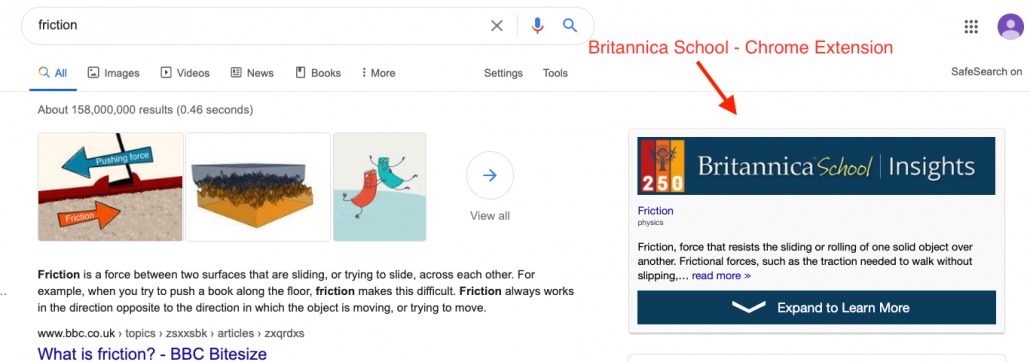
Britannica School is an important eResource to use for your research. Watch the video below to show you how to use it. Have a try yourself.
Tip: If you use Chrome you may like to install the Britannica School Chrome Extension.
The image below is an example of what it will look like.
4. Search the free Internet (if you still haven’t found what you need). Remember to critically evaluate information on the internet. We suggest using the CRAAP test.
Note: If you skip the other steps above, you will only have access to surface level material of the internet.
Critically evaluate online sources of information
READ
Not all information is good information, especially online. Evaluating sources of information is an important part of locating and selecting quality information for your research purposes.
Evaluating online information means to check the information is reliable and credible.
Definitions:
Reliable – able to be trusted
Credible – able to be believed
What does it mean to critically evaluate?
It means to to carefully consider the strengths and weaknesses, advantages and limitations of something so as to make a judgement about the value, worth or relevance of it.
How should I critically evaluate sources of information?
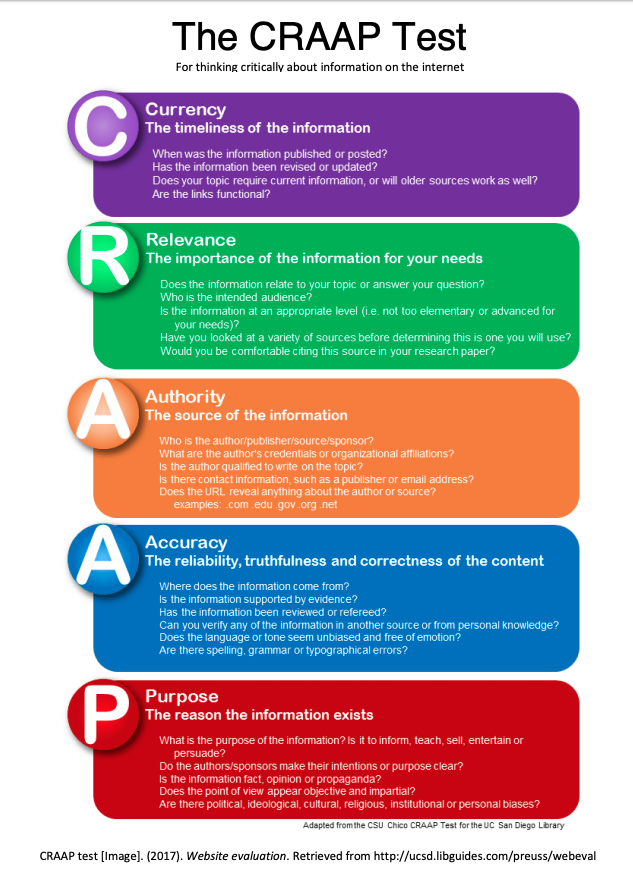
Use a criteria checklist like the CRAAP Test (see below) to help you evaluate sources of information, especially online sources.
The test provides a list of questions to ask yourself to decide whether or not a source is reliable and credible enough to use in your research.
The CRAAP Test
The CRAAP test is a set of simple questions to use to check the
reliability and usefulness of sources of information.
Click the image to the right to find out what the acronym
C-R-A-A-P stands for.
TOP TIP: Check AUTHORITY first!
Why do we recommend this?
Activity: Using the CRAAP Test
Time to practise!
Imagine you need to research the causes of water scarcity.
Is this a good website to use?
7 Reasons We’re Facing a Global Water Crisis
Your teacher will work with you to evaluate the website using the CRAAP test.
Now it’s your turn!
Imagine you need to research the causes of water scarcity.
Use the CRAAP test to decide whether or not the following three websites are good sources of information to use for your research.
Decide yes or no, and be ready to give your reasons.
3. Water scarcity is one of the greatest challenges of our time
4. Evaluate your HASS liveability sources (i.e. from your bibliography for this task).
Top Takeaways
Here is what you need to remember from today’s lesson:
- Use the resources listed in the Library Course Guides for your task.
- Use the Library Catalogue
- Use the CRAAP test when looking for information on the free Internet
- Check AUTHORITY first

(Top tips, n.d.)
References
Image References:
Group discussion [Image]. (n.d.). Retrieved from https://nvdpl.ca/event/parkgate-discussion-lounge-3
Top tips [Image]. (n.d.). Retrieved from https://absolutehealthperformance.com.au/running-nutrition-planning-is-key/